

Package management is a core part of modern Node.js development. Most developers use tools like npm, Yarn, or pnpm to install dependencies, manage packages, and run scripts. But one common issue appears in many JavaScript projects: different developers often use different package manager versions. That small mismatch can cause failed installs, broken lockfiles, dependency conflicts, and confusing setup problems in the development environment.
This is where Corepack in Node.js becomes useful.
Corepack is a built-in Node.js tool that helps manage package manager versions for your project. Instead of asking every developer to manually install the correct Yarn version or pnpm version, Corepack handles the process in a more controlled and consistent way. It helps make project setup, team collaboration, and dependency management more reliable.
In this guide, you will learn what Corepack is, how Corepack works in Node.js, why it matters, and how to use it in a real project.
Introduction to Corepack in Node.js
In the Node.js ecosystem, package managers do more than install dependencies. They also manage scripts, lockfiles, workspace support, package resolution, and project dependencies. Over time, Yarn and pnpm became popular alternatives to npm because of their speed, features, and workflow improvements in JavaScript package management.
But with more choices came a new problem. A project may depend on a specific version of Yarn or pnpm, while another developer on the same team uses a different one. Even when the source code is correct, the environment becomes inconsistent. That inconsistency can create package installation errors that are hard to track down.
Corepack was introduced to solve that issue. It gives Node.js projects a way to define which package manager and version should be used. This makes the setup process cleaner and reduces the chance of version-related problems.
What Is Corepack?
Corepack is a package manager manager built into Node.js. Its main purpose is to help your project use the correct version of a supported package manager, such as Yarn or pnpm.
In simple words, Corepack acts like a middle layer between your project and the package manager. If your project says it needs a specific version of pnpm or Yarn, Corepack makes sure that version is available and used.
Instead of telling everyone on your team to install the same package manager version manually, you can define it in the project itself. Corepack reads that configuration and handles the rest. This improves version consistency, reduces environment issues, and supports a more stable Node.js workflow.
Why Corepack Was Introduced in Node.js
Before Corepack, many teams had to write extra setup instructions in their README files. Those instructions often included:
- Install Node.js
- Install Yarn globally
- Make sure you use the correct version
- Avoid updating the lockfile with another version
This process was easy to get wrong. A new developer could install the wrong package manager version without noticing. In a CI/CD pipeline, the environment might behave differently from a local machine. Corepack was created to reduce that friction and make package manager version control part of the project itself.
Which Package Managers Corepack Supports
Corepack mainly supports:
- Yarn
- pnpm
It does not replace npm in the same way. npm already ships with Node.js and follows a different workflow. Corepack is most helpful when a project depends on Yarn package manager or pnpm package manager and needs version consistency.
Why Corepack Is Important for Developers
Corepack is important because it solves a real problem in software development. It is not just another tool to learn. It removes setup confusion and creates a more stable developer experience.
It Solves Version Consistency Problems
One of the biggest benefits of Corepack is that it helps every developer use the same package manager version. That means the install process becomes more predictable. Lockfiles are less likely to change unexpectedly, and bugs caused by version differences become less common.
It Simplifies Project Setup
When a new developer joins a project, setup should be easy. Without Corepack, they may need to install Yarn or pnpm manually and match a specific version. With Corepack, much of that work is handled automatically. This saves time and reduces mistakes in the project configuration.
It Helps Teams Work in the Same Development Environment
Consistency matters in team development. If the package manager version is defined in the project, then local machines, staging environments, and CI pipelines are more likely to behave the same way. That makes collaboration smoother and debugging easier.
How Corepack Works in Node.js
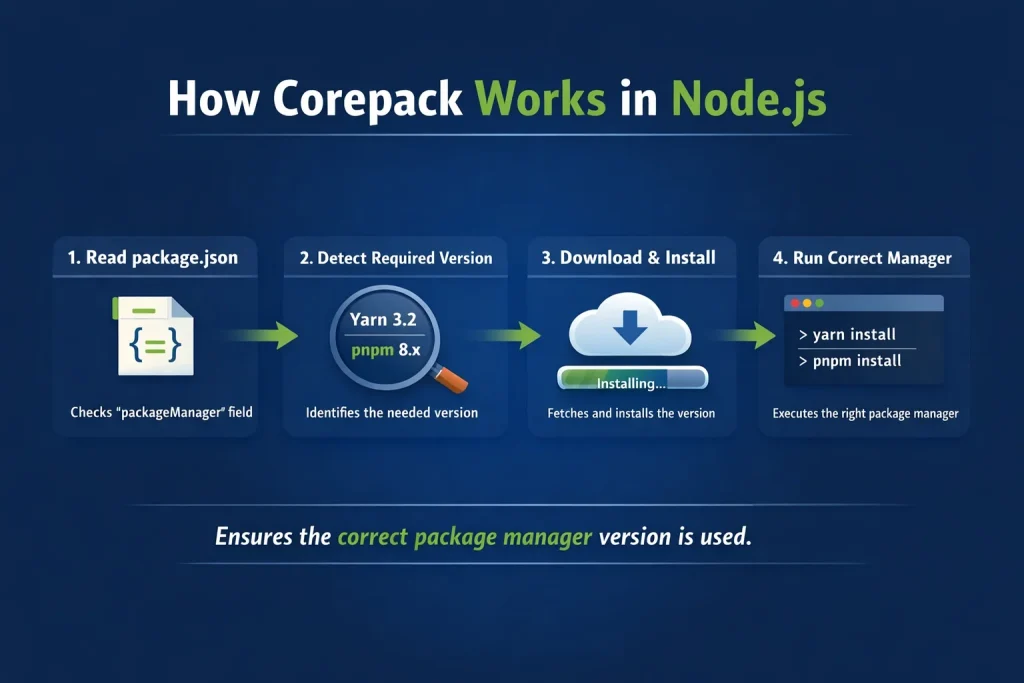
Corepack works by reading package manager information from your project and then making sure the correct tool and version are used.
The idea is simple: the project declares what it needs, and Corepack matches it automatically. This improves package management in Node.js and makes the setup process more repeatable.
The Role of the packageManager Field in package.json
Corepack uses the packageManager field in your package.json file. This field tells Node.js which package manager and version your project expects.
Here is an example:
{
  "name": "my-app",
  "version": "1.0.0",
  "packageManager": "[email protected]"
}
In this example, the project is saying it wants to use pnpm 9.0.0.
When Corepack sees this field, it knows which package manager to prepare and run. This is one of the most useful parts of Node.js package manager configuration.
How Corepack Automatically Installs Package Managers
If the required version is not already available on the machine, Corepack can download and prepare it. This means developers do not always need to install Yarn or pnpm globally themselves.
That is one of the biggest advantages of Corepack. It reduces manual setup and connects the project directly to the package manager version it expects.
How Corepack Runs the Correct Version
Once enabled, Corepack can intercept commands for supported package managers and run the matching version for the current project. So instead of relying on whatever global version happens to be installed, the project gets the version it requested.
This makes the environment more reliable and helps prevent the classic “works on my machine” problem in Node.js application development.
How to Enable Corepack
Corepack is included with many Node.js versions, but it may not always be active by default. In many cases, you need to enable it first.
Enabling Corepack in Node.js
To enable Corepack, run:
corepack enable
This command sets up the required shims so supported package manager commands can be managed through Corepack.
Verifying Corepack Installation
You can check whether Corepack is available by running:
corepack --version
If the command works, Corepack is installed and available in your environment.
Updating Package Manager Versions
If you want to set or update the package manager version for your project, you can use commands such as:
corepack use pnpm@latest
or
corepack use yarn@stable
These commands help update the packageManager setting and align the project with a specific version.
Basic Corepack Commands
Corepack does not have a large command set, but the main commands are useful and simple for most developers.
corepack enable
This enables Corepack on your system and prepares it to manage Yarn or pnpm commands.
corepack enable
corepack disable
This turns off Corepack’s command shims if needed.
corepack disable
corepack prepare
This prepares a specific package manager version for use.
corepack prepare [email protected] --activate
This is useful when you want to make sure a version is available before using it in your Node.js project setup.
corepack use
This helps define the package manager and version for the current project.
corepack use [email protected]
It can update the project configuration and make future installs more predictable.
Corepack Example in a Real Project
Let’s say you are working on a Node.js app that uses pnpm.
Your package.json might look like this:
{
  "name": "demo-app",
  "version": "1.0.0",
  "packageManager": "[email protected]"
}
Now imagine a new developer clones the project.
Instead of manually installing pnpm and hoping the version matches, they can enable Corepack and run the project commands. Corepack checks the packageManager field, prepares pnpm 9.0.0 if needed, and uses that version for the project.
This is useful because the project controls the tool version, not the individual developer’s machine setup. That helps maintain a stable development workflow and a more reliable dependency installation process.
Corepack vs npm
Many beginners think Corepack is another package manager like npm. It is not. Corepack and npm do different jobs.
The Difference Between Corepack and npm
npm is a package manager. It installs dependencies, runs scripts, and manages packages.
Corepack is a package manager version manager. It helps your project use the correct version of Yarn or pnpm.
So npm is the tool that does the package work, while Corepack helps control which package manager version gets used in a Node.js development environment.
When to Use Corepack
Corepack is useful when:
- Your project uses Yarn or pnpm
- You want version consistency across a team
- You want easier onboarding for new developers
- You want your CI/CD environment to match local development
When npm Alone Is Enough
If your project uses npm only and version control for Yarn or pnpm is not part of your workflow, you may not need Corepack. For smaller projects or simple apps, npm may be enough on its own.
Advantages of Using Corepack
Corepack offers several practical benefits for Node.js developers and development teams.
Better Version Control
The biggest advantage is version consistency. Everyone works with the same package manager version, which reduces errors and avoids mismatched lockfiles.
Easier Team Collaboration
Teams do not need to rely as much on manual setup instructions. The project itself carries more of that responsibility.
Cleaner CI/CD Workflows
In automated environments, predictable tooling matters. Corepack helps make package manager behavior more stable across pipelines.
Less Global Installation Dependence
Developers do not always need to install and manage package managers globally. That makes local setup simpler and reduces conflicts in JavaScript development workflows.
Limitations of Corepack
Corepack is useful, but it also has a few limitations.
It Is Not Always Enabled by Default
Some developers assume it will work immediately after installing Node.js, but that is not always true. In many cases, you still need to enable it first.
It Supports a Limited Number of Package Managers
Corepack is mainly designed for Yarn and pnpm. It is not a universal solution for every package tool in the JavaScript ecosystem.
It Can Be Confusing for Beginners
If someone is new to Node.js, they may already be learning npm, package.json, dependencies, and lockfiles. Adding Corepack can feel like one more layer. But once the main idea becomes clear, it is much easier to use.
Best Practices for Using Corepack
If you want to get the most value from Corepack, follow these best practices.
Always Define the Package Manager Version
Use the packageManager field in package.json. This is central to how Corepack works.
Keep Your Node.js Version Updated
Corepack support depends on your Node.js version. Using an updated Node.js release helps avoid compatibility issues.
Use Corepack in Team Projects and CI/CD Pipelines
Corepack is especially useful in shared repositories, production workflows, and automated deployment pipelines where consistency matters most.
Document the Setup Process
Even with Corepack, it still helps to mention the setup steps in your README file. A simple note like “Run corepack enable before installing dependencies” can help new contributors.
The Future of Corepack in Node.js
Corepack reflects a broader shift in development: projects are becoming more explicit about their tooling. Instead of leaving important setup details to chance, teams want reliable and repeatable environments.
That is why Corepack matters. It adds more structure to package manager management and helps reduce avoidable setup problems.
As the Node.js ecosystem continues to grow, tools like Corepack may become even more important for maintaining consistent and scalable development environments.
Frequently Asked Questions About Corepack
Is Corepack enabled by default in Node.js?
Not always. In many environments, Corepack is included with Node.js but still needs to be enabled manually.
Does Corepack replace npm?
No. Corepack does not replace npm. It manages versions of supported package managers like Yarn and pnpm.
Which package managers does Corepack support?
Corepack mainly supports Yarn and pnpm.
Is Corepack useful for small projects?
It can be, but it is most valuable in team projects, shared repositories, and environments where version consistency matters.
Do I need Corepack if I only use npm?
Usually not. Corepack is mainly helpful when your project depends on Yarn or pnpm and you want strict version control.
Conclusion
Corepack in Node.js is a useful tool for managing package manager versions in a cleaner and more reliable way. It solves a real problem that many developers and teams face: inconsistency between environments.
By using the packageManager field in package.json, Corepack makes it easier to define which version of Yarn or pnpm your project needs. That leads to smoother onboarding, more stable installs, and fewer version-related issues across development and deployment.
If you work on team-based Node.js projects or want a more predictable setup process, Corepack is worth learning. It may seem like a small tool, but it can make a big difference in how cleanly a project runs.

